
Changing the list view
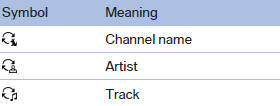
The list view changes every time the first symbol on the navigation bar is pressed.
Information on the channel is displayed
See also:
Connecting electrical devices
Sockets
The lighter socket can be used as a socket for
electrical equipment while the engine is running
or when the ignition is switched on. The total load of all sockets must not
exceed 140 Wa ...
View of an opened menu
When a menu is opened, it generally opens with
the panel that was last selected in that menu. To
display the first panel of a menu:
▷ Move the controller to the left repeatedly
until the ...
Repeating a spoken instruction
1. "Navigation"
2. "Map"
3. Highlight the
symbol.
4. Press the controller twice. ...