
Storage compartment
A storage compartment is located under the armrest between the front seats and, depending on the vehicle's equipment, also a cover for the mobile phone cradle or the snap-in adapter.
Details on this mobile phone cradle
Opening
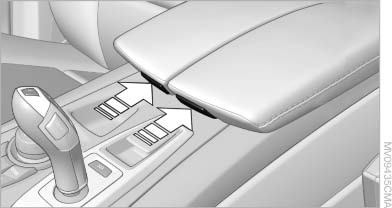
Opening
Push cover down slightly and press the button.
The cover folds upward.
Connection for an external audio device
You can connect an external audio device such as a CD or MP3 player and play audio tracks over the car's loudspeaker system:
▷ AUX-IN port.
▷ USB audio interface.
See also:
2011 BMW X3 Review by Mike Hanley
The BMW X3 may have been a pioneer among compact luxury crossovers, but a
number of competitors — including the Audi Q5, Mercedes-Benz GLK-Class and Volvo
XC60 — have entered the fray since its de ...
Twin-scroll turbocharging
The new four-cylinder engines also feature twin-scroll turbocharging. This
means that the exhaust stream from cylinders 1 and 4, and the exhaust stream
from cylinders 2 and 3, follow separate spir ...
Functional requirements
The system must have been reset when the inflation
pressure was correct; otherwise, reliable
signaling of a flat tire is not ensured. Always use
wheels with TPM electronics to ensure that the
...