
Displays in the instrument cluster
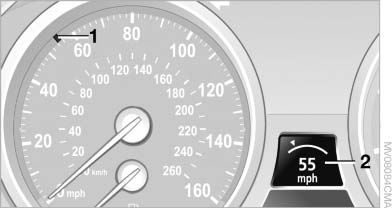 Displays in the instrument cluster
1 Stored desired speed
▷ Green: the system is active.
▷ Orange: the system is interrupted.
2 Selected desired speed appears briefly If the display --- mph or --- km/h appears briefly, conditions may not be adequate to operate the system.
Call up Check Control messages
See also:
Vehicle equipment
All standard, country-specific and optional
equipment that is offered in the model series is
described in this chapter. Therefore, equipment
is also described that is not available in a vehicle, ...
The concept
This system issues a warning at speeds above
approx. 40 mph/65 km/h if the vehicle is about
to leave the lane on roads with lane markings.
The steering wheel begins vibrating gently.
The syste ...
Symbols
Indicates precautions that must be followed
precisely in order to avoid the possibility of personal
injury and serious damage to the vehicle.
◄ Marks the end of a specific item of informat ...