
Time, date, external temperature
From radio readiness the external temperature and the time are displayed.
Set the time
Retrieving date
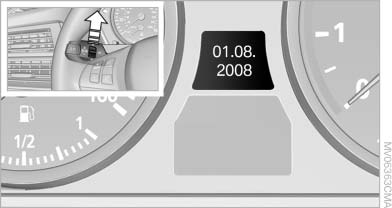
Retrieving date
Press the button on turn signal lever upward; the date appears.
Set the date
Pressing the button upward or downward several times changes the display between clock, external temperature, date, and Check Control messages
External temperature warning
If the display drops to +37 ℉/+3 ℃, a signal sounds and a warning lamp lights up. There is the increased danger of ice.
 Ice on roads
Even at temperatures above +37 ℉/+3 ℃,
there can be a risk of ice on roads.
Therefore, drive carefully on bridges and shady roads, for example, to avoid the increased danger of an accident.◀
See also:
Text messages
Calling the sender of a text message
1. Select the desired message.
2. Select the symbol.
Saving the sender in the contacts
1. Highlight the desired message.
2. Open "Options".
3. &quo ...
Switching on/off
Press the button.
▷ On: the LED lights up.
▷ Off: the LED goes out.
The system can issue warnings at speeds above
approx. 40 mph/65 km/h.
The state is stored for the remote contro ...
The Inside
The X6's cabin is something of a dichotomy. The severe dashboard angles and
technology-laden center console — which features a joystick-style gear selector
for the automatic transmission and the i ...