
Odometer, external temperature display, clock
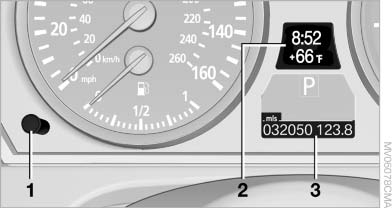
Odometer, external
temperature display, clock
1. Knob in the instrument cluster
2. Time, external temperature, and date
3. Odometer and trip odometer
See also:
Automatic Service Request
Data regarding the maintenance status or legally
mandated inspections of the vehicle are automatically
transmitted to your service center before
a service due date.
You can check when your serv ...
Sound output
Switching on/off
When the ignition is switched off: press ON/OFF
button on the radio.
Muting
When the ignition is switched on or the engine
is running: press the ON/OFF button on the
radio. ...
What to do if...
Information on suitable mobile phones.
Appointments, tasks, notes, text messages, or
e-mails from the mobile phone are not displayed.
▷ The mobile phone is not capable of the
missing funct ...