
Setting manually
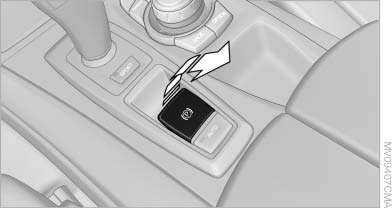
Setting manually
Pull the button. The parking brake is set.
 The indicator lamp lights up in
red. The
parking brake is set.
The indicator lamp lights up in
red. The
parking brake is set.
 Indicator lamp in Canadian
modelsTo set the parking brake, the remote control
does not need to be in the ignition lock.
Indicator lamp in Canadian
modelsTo set the parking brake, the remote control
does not need to be in the ignition lock.
 Set the parking brake and further secure
the vehicle as required
Set the parking brake and further secure
the vehicle as required
Set the parking brake firmly when parking; otherwise,
the vehicle could roll. On steep upward
and downward inclines, further secure the vehicle,
for example, by turning the steering wheel in
the direction of the curb.◀
While driving
Use while driving:
Pull the switch and hold it. The vehicle brakes hard while the button is being pulled.
 The indicator lamp lights up in
red, a signal
sounds and the brake lamps light up.
The indicator lamp lights up in
red, a signal
sounds and the brake lamps light up.
 Indicator lamp in Canadian
models.
Indicator lamp in Canadian
models.
If the vehicle is braked to a speed of approx.
2 mph/3 km/h, the parking brake remains set.
See also:
Switching the wipers on/off and brief
wipe
Do not switch on the wipers if frozen
Do not switch on the wipers if they are frozen
onto the windshield; otherwise, the wiper
blades and the windshield wiper motor may be
damaged.◀
Swi ...
Bluetooth audio
At a glance
▷ Music files on external devices such as audio
devices or mobile phones can be played
back via Bluetooth.
Use of a mobile phone as an audio source
▷ The sound is output ...
Display on the Control Display
Activating/deactivating systems
System status
Gray: the system is not activated.
Parking space search.
Blue: the system is activated. A
suitable parking space was
found.
The parking p ...