
Start/Stop button
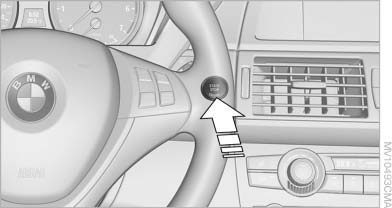
Start/Stop button
Pressing the Start/Stop button switches the ignition on or off and starts the engine.
The engine starts if the brake pedal is pressed when you press the Start/Stop button.
See also:
Calls with multiple parties
General information
You can switch between calls or connect two
calls to a single conference call. These functions
must be supported by the mobile phone and
service provider.
Accepting a call ...
Switching on automatically
With the engine running or the ignition switched
on, shift the selector lever into position R.
The image of the rear view camera is displayed
when the system has been switched on using
iDrive. ...
Audio playback
Selecting the track using the button
Press the button repeatedly
until the
desired track is played.
Selecting a track via iDrive
Audio CDs
Select the desired track to begin playback.
CDs/D ...