
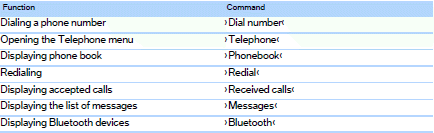
Telephone
See also:
Functional readiness of the airbag
system
When the ignition is switch on, the warning
lamp in the instrument cluster lights
up briefly and thereby indicates the operational
readiness of the entire airbag system
and the belt tensione ...
All around the headliner
All around the headliner
1.
Emergency Request
2. Glass sunroof, powered
3. Indicator lamp, front
passenger
airbag
4. Reading lamps
5. Interior lamps ...
Display
Information stage
The dimmed lamp in the mirror housing indicates
when there are vehicles in the blind spot
or approaching from behind.
Warning
If the turn signal is set while a vehicle is in ...