
Emergency Request
Requirements
> Full preparation package mobile phone: this equipment makes it possible to
send an Emergency Request even if no mobile phone is paired with the vehicle.
> BMW Assist is activated.
> Radio readiness is switched on.
> The BMW Assist system is logged into a mobile phone network that is supported
by BMW Assist.
> The Emergency Request system is operable.
Only press the SOS button in an emergency.
 For technical reasons, the Emergency
Request service cannot be guaranteed for the most unfavorable conditions.
Subscriber contractUpon expiration of the subscriber contract with BMW Assist, the BMW Assist system can be deactivated by a BMW center without a workshop visit.
After the system is deactivated, it is no longer possible to make Emergency Requests.
It may be possible for a BMW center to reactivate the system after a new contract has been signed.
Sending an Emergency Request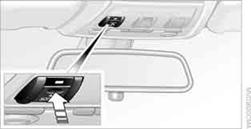
1. Briefly press the cover flap to open.
2. Press the SOS button until the LED in the button comes on.
> The LED comes on: the Emergency
Request has been triggered.
If the circumstances allow, remain in the vehicle until the voice contact has been established.
> The LED flashes when the connection to the BMW Assist Response Center has been established.
Once the BMW Assist Response Center has received your Emergency Request, the BMW Assist Response Center contacts you and takes further steps to help you. Even if you are unable to respond, the BMW Assist Response Center will be able to initiate further steps to assist you under certain conditions.
Data for determining the necessary rescue measures are transmitted to the
BMW Assist Response Center, e.g. the current position of your vehicle, if it can be determined.
> If the LED is flashing but the BMW Assist Response Center cannot be heard over the hands-free system, it is possible that the hands-free system is malfunctioning. The BMW Assist Response Center may still be able to hear you, however.
Automatically triggering an Emergency RequestUnder certain conditions, an Emergency Request is sent automatically immediately after a severe accident. An automatic Emergency Request is not affected by pressing the SOS button.
See also:
Navigation bar overview
The functions of the navigation bar symbols can
also be stored on the programmable memory
buttons ...
Opening
The tailgate pivots back and up when it opens.
Ensure that adequate clearance is available before
opening.
Provide edge protection
Sharp or angular objects can hit the rear
window while drivi ...
Driver's door controls
Roller blind for rear window
Press the button.
Extending or retracting the roller blinds
together
Press and hold the button. ...