
All around the center console
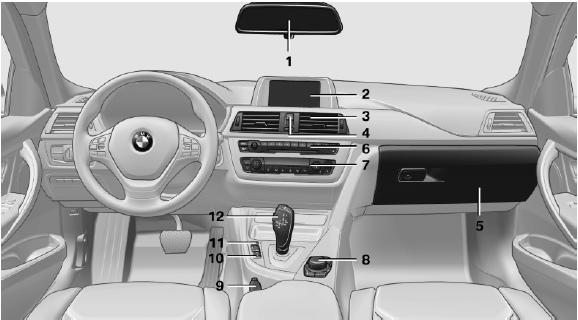
All around the center console
1 Headliner
2 Control Display
3 Ventilation
4
 Hazard warning system
 Central locking system
5 Glove compartment
6 Radio
CD/multimedia
7 Climate control
8 Controller with buttons
9 Parking brake
10
 PDC Park Distance Control
Backup camera
Parking assistant
Surround View
11
 Driving Experience Switch
 DSC Dynamic Stability Control
12 Transmission selector lever
See also:
Washer fluid reservoir
Adding washer fluid
Only add washer fluid when the engine is
cool, and then close the cover completely to
avoid contact between the washer fluid and hot
engine parts.
Otherwise, there is ...
Environmental conditions
▷ Say the commands, numbers, and letters
smoothly and with normal volume, emphasis,
and speed.
▷ Always say commands in the language of
the voice activation system.
▷ When se ...
Parking lamps/low beams,headlamp control
General information
Switch position: 0, ,
If the driver door is opened with the ignition
switched off, the exterior lighting is automatically
switched off at these switch settings.
Parking lamps
...