
Diagnosis OBD
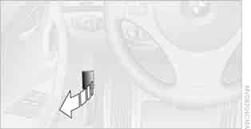
On the driver's side is an OBD socket for checking components relevant to the composition of the vehicle's emissions.
See also:
Setting the voice dialog
You can set whether the system should use the
standard dialog or a shorter version.
In the shorter variant of the voice dialog, the announcements
from the system are issued in an
abbreviated fo ...
Vehicle equipment
All standard, country-specific and optional
equipment that is offered in the model series is
described in this chapter. Therefore, equipment
is also described that is not available in a vehicle, ...
Tire inflation pressure values over 100 mph/160 km/h
320i
328i
335i
...