
Automatic Service Request
The Teleservice data necessary for servicing the vehicle are automatically sent to your BMW center prior to the service deadline. If possible, the center will contact you and a service appointment can be arranged.
Check when your BMW center was notified.
1. "Vehicle Info"
2. "Vehicle status"
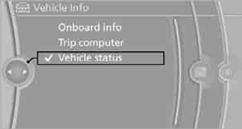
3. Open "Options".
4. "Last Service Request"
See also:
The concept
Personal Profile concept
You can set several of your vehicle's functions
to suit your personal needs and preferences.
▷ The settings are automatically saved in the
profile currently activa ...
Initializing after a power failure
After a power failure during the opening or closing
process, the roof can only be operated to a
limited extent.
Initializing the system
The system can be initialized when the vehicle
is statio ...
Coolant temperature
Should the coolant, and with it the engine, become
too hot, a Check Control message is displayed.
Check the coolant level. ...