
Service Request
At a glance
Inform your BMW center that you need to schedule a service appointment. The Teleservice data is transmitted during a Service Request. If possible, your BMW center will establish contact with you.
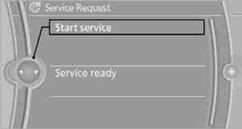
Starting a Service Request1. "BMW Assist" or "ConnectedDrive"
2. "Service Request"
3. "Start service"
See also:
LATCH child restraint fixing system
LATCH: Lower Anchors and Tethers for CHildren.
Coupe: rear seats
The anchor points for the lower LATCH anchors are located behind the labeled
protective caps.
Convertible: rear seats
To inst ...
Bluetooth audio
At a glance
▷ Music files on external devices such as audio
devices or mobile phones can be played
back via Bluetooth.
Use of a mobile phone as an audio source.
▷ The sound is outpu ...
Software Update
The vehicle supports various external devices
depending on the current software version. With
a software update, the vehicle can support new
cell phones or new external device, for example.
The ...