
Storing music
The music tracks from CDs, DVDs and USB devices can be stored in the music collection in the vehicle and played from there.
> Audio CD: tracks are converted into a compressed audio format when they are
stored. If available, information on the album, such as the artist, is stored as
well.
> CD/DVD or USB device with compressed audio files: the entire content of the CD/
DVD or the USB device is stored in the vehicle as an album. After storing, the tracks
and directories can be deleted individually. Files are only stored in the WMA, MP3,
M4A, and AACformats.
Tracks with DRM copy protection can be stored in the vehicle but cannot be played back.
 Regularly back up the music data; otherwise,
it could be lost if there is a fault on the hard disc.
Regularly back up the music data; otherwise,
it could be lost if there is a fault on the hard disc.
 Music recognition technology and related data
are provided by
Music recognition technology and related data
are provided by
Gracenote®. Gracenote® is the industry standard in music recognition technology and related content delivery. For more information, please visit www.gracenote.com.
CD and music-related data from Gracenote, Inc., copyright © 2000-2009 Gracenote. Gracenote Software, copyright © 2000-2009
Gracenote. This product and service may practice one or more of the following U.S. Patents:
5.987.525, 6.061.680, 6.154.773, 6.161.132, 6.230.192, 6.230.207, 6.240.459 and 6.330.593 as well as other granted or pending patents. Some services supplied under license from Open Globe, Inc. for U.S. Patent:
6.304.523.
Gracenote and CDDB are registered trademarks of Gracenote. The Gracenote logo and logotype, and the "Powered by Gracenote" logo are trademarks of Gracenote.
Storing files from CDs/DVDsCDs/DVDs can only be stored from the CD/DVD player.
1. Insert a CD/DVD into the CD/DVD player.
2. "CD/Multimedia"
3. "CD/DVD"
4. Select the  symbol for the CD/DVD player.
5. "Store in vehicle"
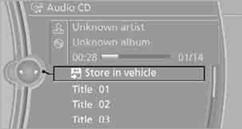
The music collection is displayed.
The tracks are stored and played back in sequence from the music collection.
Observe the following during the storage process:
Do not switch back to the CD/DVD player and do not remove the CD/DVD from the CD/DVD player; otherwise, the storage process will be interrupted.
You can switch to the other audio sources without interrupting the storage process. Tracks from the current CD/DVD can also be called up, if they have been stored already.
Interrupting storage
1. "CD/Multimedia"
2. "CD/DVD"
3. "Storing..."
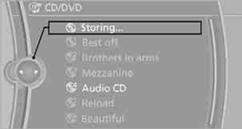
4. "Cancel storing"
The storage process is interrupted and can be continued at any time.
Continuing the storage process
1. "CD/Multimedia"
2. "CD/DVD"
3. Select the  symbol for the CD/DVD player.
4. "Continue storing"
The storing of the CD/DVD continues at the beginning of the track at which storing was interrupted.
Album information
During storage, information such as the name of the artist is stored with the track, if this information is available in the vehicle database or on the CD.
To update the database, contact your service center.
Storing from a USB device
To store music, a suitable device must be connected to the USB interface in the glove compartment.
> Suitable devices: USB mass storage devices, such as USB flash drives or MP3 players with a USB interface.
> Unsuitable devices: USB hard drive, USB hubs, USB memory card readers with multiple inserts, Apple iPod/iPhone.
Music from Apple iPods/iPhones can be played via the USB audio interface in the center armrest.
 Music from a USB device can be stored only via the USB interface in the glove
compartment.
Music from a USB device can be stored only via the USB interface in the glove
compartment.
1. Connect the USB device to the USB interface in the glove compartment.
2. "CD/Multimedia"
3. "Music collection"
4. Open "Options".
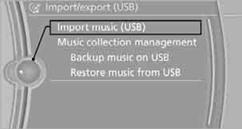
5. "Music data import/export"
6. "Import music (USB)"
See also:
The interplay of surfaces and lines fills the interior with life
The interior of the new BMW 3-Series Sedan is straight out of the BMW design
handbook. The driver-focused cockpit wraps around the driver and puts all the
important controls within easy reach. The ...
Automatic mode
The Auto Start/Stop function is operational after
each engine start.
The function is activated above a certain speed.
► Automatic transmission: from 5 mph, approx.
9 km/h. ...
Child seat security
Child seat security
The rear safety belts and the front passenger
safety belt can be locked against pulling out for
mounting the child restraint fixing systems.
Locking the safety belt
1. Pul ...