
Storing a channel
1. "Radio"
2. "Satellite radio"
3. Select "All channels" or a desired category.
4. Select the desired channel.
5. Press the controller again.
6. Press the controller again to confirm the highlighted channel.
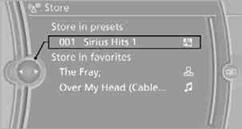
7. Select the desired memory location.
The channels are stored for the remote control currently in use.
You can also store the channels on the programmable memory keys.
See also:
Text messages
Text messages at the upper edge of the Control
Display in combination with a symbol in the instrument
cluster explain a Check Control message
and the meaning of the indicator and warning
lamps ...
Headphones, vehicle
loudspeakers
Connecting the headphones
Normal headphones
Connect via the jack 1/8"/3.5 mm, on the rear CD/DVD player.
Infrared headphones
Connection via the infrared interface on the
lower edge of the s ...
PDC Park Distance Control
The concept
In addition to the PDC Park Distance Control, the
backup camera, can be
switched on.
PDC supports you when parking. Objects that
you are approaching slowly in front of or behind
yo ...