
Safety belts
 Observe the adjustment instructions on page
45 to ensure the best possible personal protection.
Observe the adjustment instructions on page
45 to ensure the best possible personal protection.
Before every drive, make sure that all occupants wear their safety belts. Airbags complement the safety belt as an additional safety device, but they do not represent a substitute.
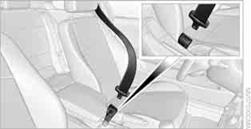
Make sure you hear the latch plate engage in the belt buckle.
The upper belt anchor is suitable for adults of any stature as long as the seat is adjusted properly.
Opening1. Grasp the belt firmly.
2. Press the red button in the buckle.
3. Guide the belt into its reel.
 Safety belt reminder for front seatsThe
indicator lamps light up and an acoustic signal sounds. In addition, a
Safety belt reminder for front seatsThe
indicator lamps light up and an acoustic signal sounds. In addition, a
message appears on the Control Display. Check whether the safety belt has been fastened correctly.
The 'Fasten safety belts' reminder is issued as long as the driver's safety belt has not been fastened. The 'Fasten safety belts' reminder is also issued above approx. 5 mph/8 km/h if the front passenger safety belt has not been fastened, if there are objects on the front passenger seat or if the driver or front passenger unfasten their safety belts.
Damage to safety belts If the safety belts are damaged or stressed
in an accident: have the belt system, including any belt tensioners or child restraint
systems, replaced and the belt anchors checked. Have this work done only by your
BMW center or at a workshop that works according to BMW repair procedures with correspondingly
trained personnel. Otherwise, it is not guaranteed that the safety devices will
function properly.
See also:
Gas station recommendation
The remaining range is calculated, and if necessary
gas stations along the route are displayed.
1. "Navigation"
2. "Route information"
3. "Recommended refuel"
A lis ...
Route
Different views of the route are available during
destination guidance:
▷ Arrow view.
▷ List of route sections.
▷ Map view.
▷ Arrow view in the Head-up Display ...
Dynamic, efficient and innovative: the new BMW 3 ActiveHybrid
In autumn 2012 a further model will join the BMW 3-Series. In the new 3
ActiveHybrid - a full hybrid at the premium end of the sports sedan class - the
innovative BMW ActiveHybrid powertrain techn ...