
Visual warning
The approach to an object can be shown on the Control Display. Objects that are farther away are displayed on the Control Display before a signal tone sounds.
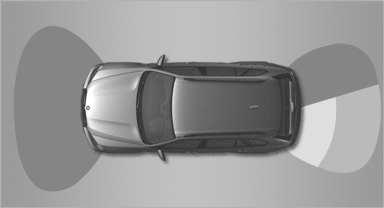
Visual warning
The display appears as soon as PDC is activated.
If the last image selected was the rear view camera, this is displayed again. To switch to PDC:
 "Switch off rear
view camera"
The setting is stored for the remote control currently
in use.
"Switch off rear
view camera"
The setting is stored for the remote control currently
in use.
See also:
Выбираем жидкость для омывания стекол
Автомобильные «дворники» появились около 80 лет назад, омыватели ветровых стекол – чуть больше полувека. Незамерзающие жидкости, зовущиеся в народе «омывайками», &ndas ...
Antilock Brake System ABS
ABS prevents locking of the wheels during braking.
The vehicle remains steerable even during full
brake applications, thus increasing active
safety.
ABS is operational every time you start the ...
Remove attached partsfollowing use
Remove auxiliary mirrors, roof or rear luggage
racks which are no longer required following
use.
Attached parts on the vehicle impair the aerodynamics
and increase the fuel consumption. ...