
In the glove compartment
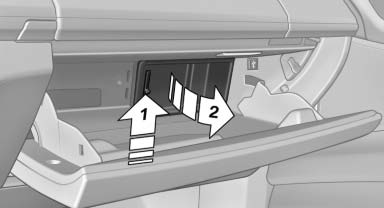
Push the handle up, arrow 1, and open the lid, arrow 2.
See also:
Rear view: striking indications of dynamic and secure roadholding.
From the rear, the new BMW 6-Series Coupe exudes power, athleticism and
solidity. Bulging wheel arches accentuate the wide track of the new car,
offering a hint of its impressive roadholding. Adde ...
Climate control operation on the
headliner
Temperature
Turn the wheel to set the desired
temperature.
Air volume
Press the left or right side of
the button:
decrease or increase air volume.
LEDs indicate the intensity of the air s ...
Leafing through the Owner's Manual
Page by page with link access
Turn the controller until the next or previous
page is displayed.
Page by page without link access
Leaf through the pages directly while skipping
the links.
Highl ...