
Replacing the battery
The remote control for Comfort Access contains a battery that will need to be replaced from time to time.
1. Take the integrated key out of the remote control.
2. Remove the cover.
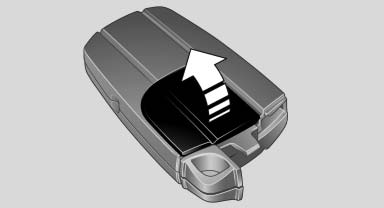
Remove the cover
3. Insert a new battery of the same type with the positive side facing upwards.
4. Press the cover closed.
 Return used battery to a
recycling collection
point or to your service center.
Return used battery to a
recycling collection
point or to your service center.
See also:
Starting the engine
Starting the engine
Remote control in the ignition lock or, with Comfort
Access, inside the vehicle
1. Depress the brake pedal.
2. Press the Start/Stop button.
The starter operates automatical ...
Storage compartments in the
cargo area
Net
Smaller objects can be stored in the net on the
side of the cargo area.
To transport larger objects, it can be pushed
down.
Multi-function hook
A multi-function hook is available on the le ...
Navigation system
This chapter contains various examples of how
the navigation system can guide you reliably to
your destination. ...