
Displaying messages
1. "Office"
2. "Messages"
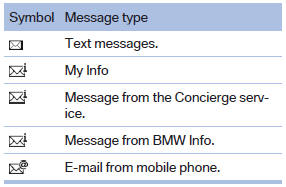
A symbol identifies the type of message.
See also:
Maintenance and repairs
Advanced technology, e.g., the use of modern
materials and high-performance electronics, requires suitable maintenance and
repair methods.
Therefore, have this work performed only by a
BMW cent ...
Protective action
Airbags are not triggered in every impact situation,
e.g., in less severe accidents or rear-end
collisions.
Information on how to ensure the optimal
protective effect of the airbags
► Keep ...
In the cargo area
Open the cover on the right side trim.
Information on the fuse types and locations is
found on a separate sheet. ...