
Volume
- "Speed volume": speed-dependent volume control.
- "PDC": volume of the PDC signal* compared to the entertainment sound output.
- "Gong": volume of the signal, such as the safety belt reminder, compared to the entertainment sound output.
- "Microphone": volume of the microphone* during a phone call.
- "Loudspeak.": volume of the loudspeakers* during a phone call.
The following volumes are only stored for the respective paired telephone: "Microphone", "Loudspeak.".
Adjusting the volume
1. "CD/Multimedia", "Radio" or "Settings"
2. "Tone"
3. "Volume settings"
4. Select the desired volume setting.
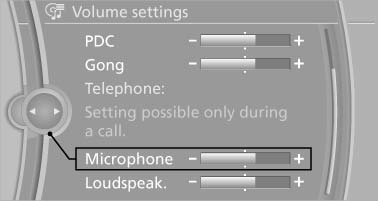
5. To adjust: turn the controller.
6. To store: press the controller.
See also:
Continuing destination guidance
If the destination was not reached during the last
trip, destination guidance can be resumed.
"Resume guidance" ...
Daytime running lights
The daytime running lights light up in position
0, and
. After the ignition is
switched off, the parking lamps light up in position
Activating/deactivating
1. "Settings"
2. " ...
Changing the scale
1. Select the symbol.
2. To change the scale: turn the controller.
Automatically scaled map scale
In the map view facing north, turn the controller
in any direction until the AUTO scale is displa ...