
Equalizer
Setting for individual audio frequency ranges.
Adjusting the equalizer
1. "CD/Multimedia", "Radio" or "Settings"
2. "Tone"
3. "Equalizer"
4. Select the desired setting.
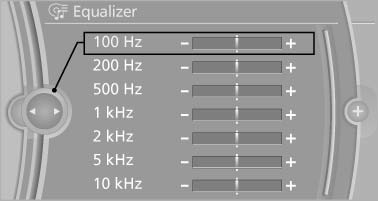
5. To adjust: turn the controller.
6. To store: press the controller.
See also:
Overview
The premium compact BMW 1-Series is already synonymous with driving pleasure.
Now, the second generation offers state-of-the-art engine and suspension
technology, further improvements in fuel effi ...
Required fuel
Super premium gasoline/AKI 91
This gasoline is highly recommended.
Gasoline with lower AKI
However, you may also use gasoline with less
AKI.
The minimum AKI Rating is 89.
If you use gasoline wi ...
The concept
BMW X5
BMW X5
▷ During normal brake application, the outer
brake lamps light up.
▷ During heavy brake application, the inner
brake lamps light up in addition.
BMW X6
BMW X6
& ...