
Driver's side
Opening
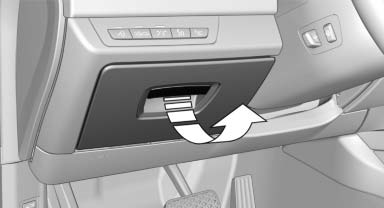
Pull the handle.
 Close the glove compartment again immediately
Close the glove compartment immediately after use while driving; otherwise, injury may occur during accidents.
Closing
Fold up the cover.
See also:
Double-joint front axle with spring struts and anti-roll bar
The front axle of the new BMW sports sedan is based on a proven design which
provides an optimal fusion of driving dynamics and comfort. The wheel suspension
combines maximum stiffness with minimu ...
Front ventilation
Front ventilation
▷ Lever for changing the air flow direction, arrow
1.
▷ Thumbwheels for opening and closing the
vents continuously, arrows 2.
▷ Thumbwheel to vary the temp ...
Automatic climate control
1 Vent settings
2 Air volume
3 AUTO program
4 Interior temperature sensor — always keep
clear
5 Recirculated-air mode
6 Temperature
7 Defrosting windows and removing condensation
8 Cooling f ...