
Front ventilation
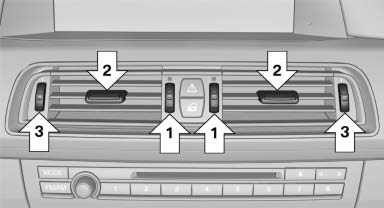
- Thumbwheels for adjusting the temperature,
arrows 1.
Toward blue: colder.
Toward red: warmer. - Lever for changing the air flow direction, arrow 2.
- Thumbwheels for opening and closing the vents continuously, arrows 3.
Ventilation levels
- Draft-free ventilation:
Thumbwheel, arrow 3, in level :
the air
current is fanned out.
:
the air
current is fanned out. - Maximum air volume:
Thumbwheel, arrow 3, in level
 :
the air is
partially fanned out and partially bundled.
This maximizes the air supply.
:
the air is
partially fanned out and partially bundled.
This maximizes the air supply. - Direct ventilation:
Thumbwheel, arrow 3, in level
 :
the air is
bundled and can be directed to a specific
point.
:
the air is
bundled and can be directed to a specific
point.
Adjusting the ventilation
- Ventilation for cooling: Adjust the vent to direct the air in your direction, e.g., if the vehicle interior is hot from the sun.
- Draft-free ventilation: Adjust the vent to let the air flow past you.
See also:
Saying commands
Activating voice activation system1. Press the button on the steering wheel.
2. Wait for the acoustic signal.
3. Say the command.
This symbol on the Control Display and
...
Backup camera
The concept
The backup camera provides assistance in parking
and maneuvering backwards. The area behind
the vehicle is shown on the Control Display.
System limits
Check the traffic situation a ...
Avoiding unintentional alarms
The tilt alarm sensor and interior motion sensor
can be switched off together, such as in the following
situations:
▷ In automatic car washes.
▷ In duplex garages.
▷ During tr ...