
Operating the programs
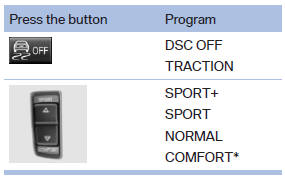
For Dynamic Damper Control*, the lower button is labeled with COMFORT.
Automatic program change
The system automatically switches to NORMAL in the following situations:
- Failure of Integral Active Steering*.
- Failure of Dynamic Damping Control*.
- The vehicle has a flat tire.
See also:
Signal tones
When approaching an object, an intermittent
tone is sounded that indicates the position of the
object. For example, if an object is detected to
the left rear of the vehicle, a signal tone sounds ...
System limits
Top View cannot be used in the following situations:
▷ With a door open.
▷ With the tailgate open<>.
▷ With an exterior mirror folded in.
▷ In poor light.
The arrows ...
BMW X5 without 3rd row seats
BMW X5 without 3rd row seats
Unlock the center armrest with the button in the
lower section of the opening and fold down. ...