
Increasing or decreasing vehicle speed
You can specify your desired speed in the range from approx. 4 mph/6 km/h to approx. 15 mph/ 25 km/h using the rocker switch of the cruise control on the steering wheel. You can change the vehicle speed by pressing on the accelerator lightly.
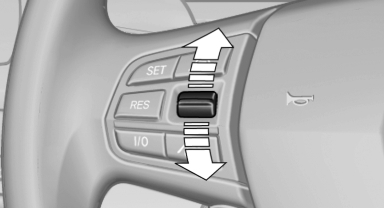
- Press up the rocker switch to the point of resistance: the speed increases gradually.
- Press up the rocker switch past the point of resistance: the speed increases while the rocker switch is pressed.
- Press down the rocker switch to the point of resistance: the speed decreases gradually.
- Press down the rocker switch past the point of resistance: when driving forward, the speed decreases to approx. 6 mph/10 km/h; when reversing, the speed decreases to approx. 4 mph/6 km/h.
See also:
Interior
Up to five occupants have ample space in the 760i sedan, and passengers in
the backseat of the extended-length 760Li enjoy even more legroom. An Active
Support massage feature is included in the d ...
Indication of a flat tire
The yellow warning lamp lights up. A
Check Control message is displayed.
There is a flat tire or a major loss in tire
inflation pressure.
1. Reduce your speed and stop cautiously.
Avoid sudde ...
NORMAL
For a balanced tuning with maximum driving stabilization.
Activating NORMAL
Press the button repeatedly until
the
program display in the tachometer
goes out.
In certain situations, the syste ...