
Calling up information on the info display
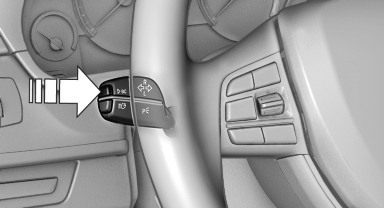
Press the computer button on the turn signal lever.
Information is displayed on the info display of the instrument cluster.
See also:
Adjusting the volume
Turn the volume button while giving an instruction
until the desired volume is set.
▷ The volume remains constant even if the
volume of other audio sources is changed.
▷ The volume i ...
Controls
Controls
1 Display screen
2 Infrared interface for headphones
3 CD/DVD player
4 Headphone connection: jack plug
5 12 V sockets ...
Emissions
The warning lamp lights up:
The vehicle is producing higher emissions. The trip can be continued. Have the
car checked as soon as possible.
Canadian models display this warning lamp.
The lamp f ...