
Indication in the info display
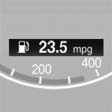
The information from the computer is shown in the Info display in the instrument cluster.
See also:
Office
...
Tire damage
General information
Inspect your tires often for damage, foreign objects
lodged in the tread, and tread wear.
Notes
Driving over rough or damaged road surfaces, as
well as debris, curbs and other ...
Vehicle equipment
All standard, country-specific and optional
equipment that is offered in the model series is
described in this chapter. Therefore, equipment
is also described that is not available in a vehicle,
e ...