
Instrument cluster, electronic displays
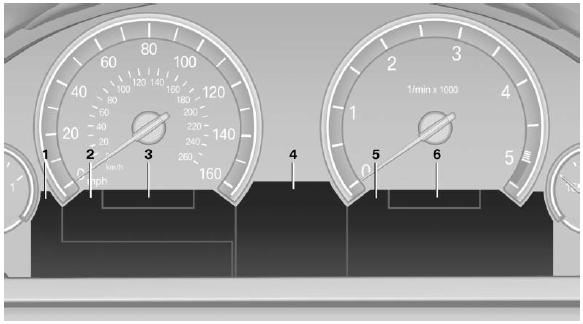
1 Symbols and messages, e.g., warnings
2 Range
3 Computer
4 Navigation display
Service display
5 Selection list, e.g., radio
6 Transmission displays
See also:
Opening the main menu
Press the button.
The main menu is displayed
The main menu is displayed.
All iDrive functions can be called up via the main
menu. ...
Overview, Instrument cluster with enhanced features
1 Fuel gauge
2 Speedometer
3 Indicator/warning lamps
4 Tachometer
5 Engine oil temperature
6 Electronic displays
7 Display/reset miles ...
Using the door lock
General information
Locking from the outside
Do not lock the vehicle from the outside if
there are people in it, as the vehicle cannot be
unlocked from inside without special knowledge.◀ ...