
Navigation
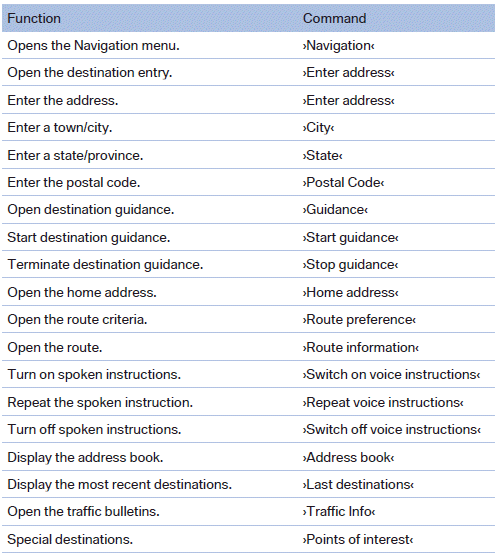
General information
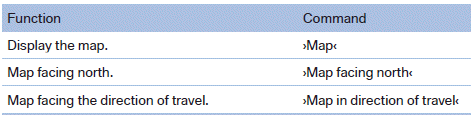
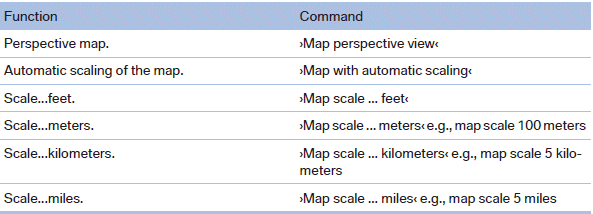
Map
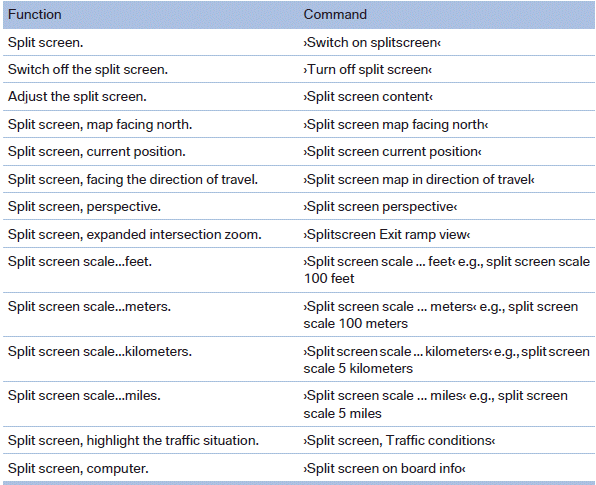
Split screen settings

Destination guidance with intermediate destinations
See also:
What to do if...
Information on suitable mobile phones.
Appointments, tasks, notes, text messages, or
e-mails from the mobile phone are not displayed.
▷ The mobile phone is not capable of the
missing funct ...
Adjusting the volume
Turn the volume button while giving an instruction
until the desired volume is set.
► The volume remains constant even if the
volume of other audio sources is changed.
► The volume i ...
Bypassing a section of the route
Calculate a new route for a route section.
1. "Navigation"
2. "Route information"
3. "New route for"
4. Turn the controller. Enter the number of kilometers
within ...