
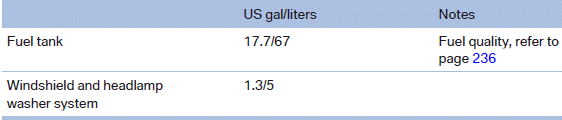
Capacities
See also:
Functional requirements
The system must have been reset while the inflation
pressure was correct; otherwise, reliable
signaling of a flat tire is not ensured.
Always use wheels with TPM electronics to ensure
that the ...
Left/right-hand steering
The digital compass is already set for right or
left-hand steering at the factory. ...
Sitting safely
The ideal sitting position can make a vital contribution to relaxed, fatigue-free
driving. In conjunction with the safety belts, the head restraints and the airbags,
the seated position has a majo ...