
Service Request
At a glance
Sends information to your service partner to request the arrangement of a service appointment.
The TeleService data is transmitted during a Service Request. If possible, your service partner will establish contact with you.
Starting a Service Request
1. "BMW Assist" or "ConnectedDrive"
2. "Service Request"
3. "Start service"
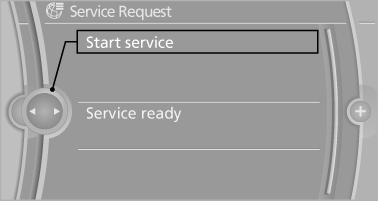
A Service Request can be started via a Check Control message.
See also:
Opening
1. Unlock the belt lock of the center safety belt
in the rear using the latch plate of another
safety belt.
2. Insert the latch plate at the end of the belt
into the specially designated fixtur ...
Setting the compass zones
Sets the particular compass zones on the vehicle
so that the compass operates correctly; refer
to World map with compass zones.
World map with compass zones
World map with compass zones
Proce ...
Instrument cluster, electronic displays
1 Symbols and messages, e.g., warnings
2 Range
3 Computer
4 Navigation display
Service display
5 Selection list, e.g., radio
6 Transmission displays ...