
Controls
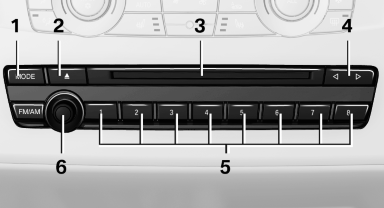
1 Change the entertainment source
2 Eject CD/DVD
3 CD/DVD drive
4 Change station/track
5 Programmable memory buttons
6 Volume, on/off
See also:
Connecting a particular mobile phone
If more than one mobile phone is detected by the
vehicle, the mobile phone at the top of the list is
connected. If a different detected cell phone is
connected with the vehicle. A different mobi ...
Tire damage
General information
Inspect your tires often for damage, foreign objects
lodged in the tread, and tread wear.
Notes
Indications of tire damage or other vehicle defects:
Unusual vibrations dur ...
Features
The 2009 X3 starts at $39,700 and comes standard with leatherette upholstery,
eight-way power front seats, a panoramic moonroof and rain-sensing windshield
wipers. There are four option packages a ...