
Volume
► "Speed volume": speed-dependent volume
control.
► "PDC": volume of the PDC signal compared
to the entertainment sound output.
► "Gong": volume of the signal, e. g., the safety
belt reminder, compared to the entertainment
sound output.
► "Microphone": volume of the microphone
during a phone call.
► "Loudspeak.": volume of the loudspeakers
during a phone call.
The following volumes are only stored for the
respective paired telephone: "Microphone",
"Loudspeak.".
Adjusting the volume
1. "CD/Multimedia", "Radio" or "Settings"
2. "Tone"
3. "Volume settings"
4. Select the desired volume setting.
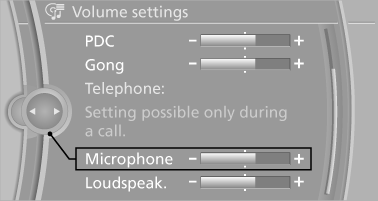
5. To adjust: turn the controller.
6. To store: press the controller.
See also:
The concept
This system issues a warning at speeds above
approx. 40 mph/65 km/h if the vehicle is about
to leave the lane on roads with lane markings.
The steering wheel begins vibrating gently.
The syste ...
Displays in the instrument cluster
The transmission position is
displayed,
e.g.: P. ...
Deleting messages
Messages from the Concierge service and
My Info can be deleted.
Delete a message:
1. "Office"
2. "Messages"
3. Select the desired message.
4. Open "Options".
5. & ...