
Equalizer
Setting for individual audio frequency ranges.
Adjusting the equalizer
1. "CD/Multimedia", "Radio" or "Settings"
2. "Tone"
3. "Equalizer"
4. Select the desired setting.
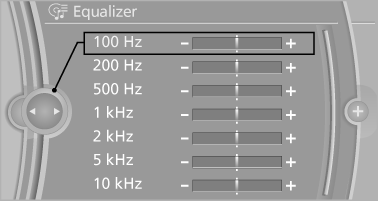
5. To adjust: turn the controller.
6. To store: press the controller.
See also:
Instrument cluster
At a glance
1 Fuel gauge
2 Speedometer
3 Indicator/warning lamps
4 Tachometer
5 Engine oil temperature
6 Electronic displays
7 Reset miles ...
Replacing components
Vehicle equipment
All standard, country-specific and optional
equipment that is offered in the model series is
described in this chapter. Therefore, equipment
is also described that is not avai ...
BMW X5: rear
BMW X5: rear
1. Lift off the wiper arm completely and pull off
the wiper blade, refer to arrow.
2. Mount the new wiper blade and press on
until it is heard to engageLamp and bulb replacement ...