
Increasing or decreasing vehicle speed
Specify desired speed in the range from approx.
4 mph/6 km/h to approx. 15 mph/25 km/h using the rocker switch of the cruise control on the steering wheel. Vehicle speed can be changed by lightly accelerating.
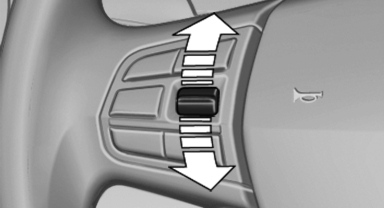
► Press up the rocker switch to the point of
resistance: the speed increases gradually.
► Press up the rocker switch past the point of
resistance: the speed increases while the
rocker switch is pressed.
► Press down the rocker switch to the point of
resistance: the speed decreases gradually.
► Press down the rocker switch past the point
of resistance: when driving forward, the
speed decreases to approx. 6 mph/10 km/h;
when reversing, the speed decreases to approx.
4 mph/6 km/h.
See also:
Message from the Concierge service
Starting destination guidance
1. Select the desired message.
2.
"Start guidance" or "Add as another
destination"
3. Start destination guidance, if necessary.
Dialing ...
Parts and accessories
For your own safety, use genuine parts and accessories
approved by BMW. When you purchase
accessories tested and approved by
BMW and Genuine BMW Parts, you simultaneously
acquire the assurance ...
EXTERIOR
It's only fitting that a crossover with such performance prowess has such a
chiseled, athletic figure. Despite its considerable size, the X5 looks fit and
trim. Unmistakably a BMW, the X5 has the ...