
Weights
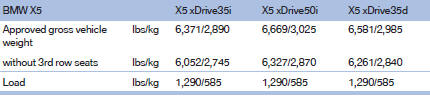
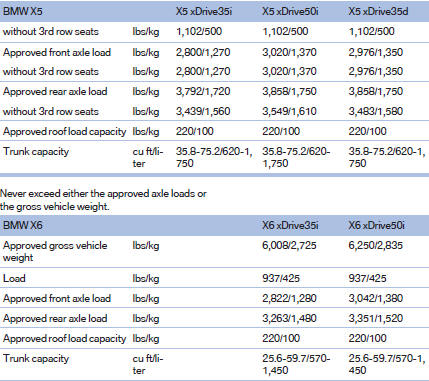
Never exceed either the approved axle loads or the gross vehicle weight.
See also:
Destination guidance with traffic
bulletins
Semi-dynamic destination guidance
When traffic bulletin reception is switched on,
semi-dynamic destination guidance is active.
The destination guidance system takes the
available traffic informa ...
Rear doors
Rear doors
Push the locking lever on the rear doors down.
The door can now be opened from the outside
only. ...
Received calls
Displaying calls
The 20 calls that were last received are displayed.
1. "Telephone".
2. "Received calls"
Calling a number from the list
Selecting an entry.
The connection i ...