
Activating
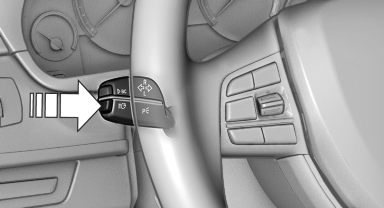
1. Turn the light switch to  or
or
 .
.
2. Press the button on the turn signal lever, arrow.
 The indicator lamp in the
instrument
cluster lights up.
The indicator lamp in the
instrument
cluster lights up.
When the lights are switched on, the high beams are switched on and off automatically.
The system responds to light from oncoming traffic and traffic driving ahead of you, and to adequate illumination, e.g., in towns and cities.
See also:
Vehicle equipment
This Owner's Manual describes all models and
all standard, country-specific and optional
equipment that is offered in the model series.
Therefore, in this Owner's Manual, equipment is
also desc ...
Reading out loud
Text messages, e-mails, appointment entries,
tasks, and notes can be read out loud.
1. Select the desired message, appointment,
task, or note.
2. Select the symbol.
The following options are a ...
Pairing/unpairing the mobile phone
General information
The following functions are available:
► Use of a mobile phone as a telephone.
► Use of a mobile phone as an additional telephone.
► Use of a mobile phone a ...