
Rear seat heating
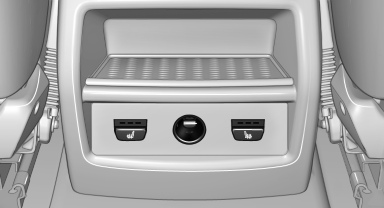
Switching on
 Press the button once for each
temperature
level.
Press the button once for each
temperature
level.
The maximum temperature is reached when three LEDs are lit.
If the drive is continued within approx. 15 minutes, the seat heating is activated automatically with the temperature selected last.
Switching off
Press the button longer.
The LEDs go out.
See also:
The Appendage Factor
M cars have had what I call a high appendage factor — the feeling that the
car is an extension of the driver. It's typically experienced in cars whose
various systems and characteristics are well- ...
Tailormade driving dynamics
The latest generation BMW 7-Series is the first to have Dynamic Driving
Control featuring Dynamic Damping Control as standard. Dynamic Driving Control
is the umbrella function that lets a driver c ...
Hydroplaning
On wet or slushy roads, a wedge of water can
form between the tires and road surface.
This phenomenon is referred to as hydroplaning.
It is characterized by a partial or complete
loss of contact ...