
Buttons on the remote control
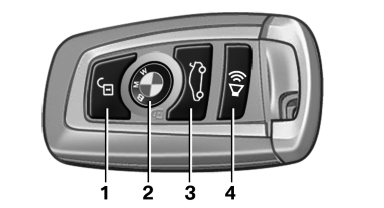
1 Unlocking
2 Locking
3 Opening the tailgate
4 Panic mode, headlamp courtesy delay feature
See also:
Oil change
An oil change should be carried out by your
service center only.
...
Distance
Selecting a distance
Adjust the distance according to the traffic
and weather conditions; otherwise, there is the
danger of an accident occurring. Maintain the
prescribed safety distance.
...
Clock
The settings are stored for the remote control currently in use, refer also to
Personal Profile on page 28.
Setting the timeIn the instrument cluster
To set the 12h/24h format, refer to Se ...