
All around the center console
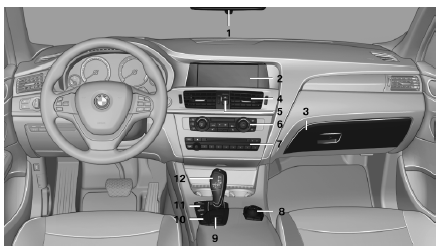
1 Headliner
2 Control Display
3 Glove compartment
4 Air vent
5  Hazard warning system
 Central locking system
6 Automatic climate control
7 Radio
CD/multimedia
8 Controller with buttons
9  Parking brake
 Auto Hold
10  PDC Park Distance Control
Backup camera
Top View
 HDC Hill Descent Control
11  Driving Experience Switch
 DSC Dynamic Stability Control
12 Automatic transmission
See also:
Buckling the belt
Buckling the belt
Make sure you hear the latch plate engage in the
belt buckle. ...
Changing settings
1. Select a field.
2. Turn the controller until the desired setting
is displayed.
3. Press the controller. ...
Possible commands
Most menu items on the Control Display can be spoken as commands.
The available commands depend on which menu is currently selected on the Control
Display.
There are short commands for functions o ...