
Adjusting
 Danger of burns when screen is folded out
Do not reach behind the screen; otherwise,
there is the danger of getting burned. The
back of the screen can become very hot.◀
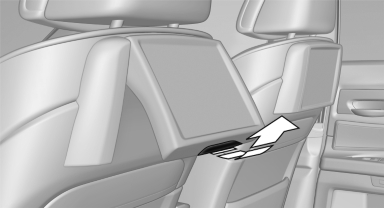
▷ To fold out: pull at the bottom edge.
▷ To fold in: press against the bottom edge.
See also:
Technical data
Vehicle equipment
All standard, country-specific and optional
equipment that is offered in the model series is
described in this chapter. Therefore, equipment
is also described that is not avai ...
Snow chains
Fine-link snow chains
Only certain types of fine-link snow chains have
been tested by the manufacturer of your vehicle,
classified as road-safe and recommended.
Consult your service center for mor ...
Loading
1. Fold down the center armrest, press the button
and open the cover.
Loading
2. Press the button again; the cover in the
cargo area opens. If you press the button
firmly the first time, thi ...