
Controls
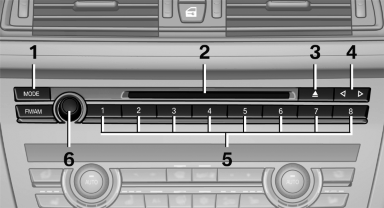
1 Change the entertainment source
2 CD/DVD drive
3 Eject CD/DVD
4 Change station/track
5 Programmable memory buttons
6 Volume, on/off
See also:
Low beams
Switch position with the
ignition switched
on: the low beams light up. ...
Profile management
Opening the profiles
A different profile can be called up than the one
associated with the remote control currently in
use.
1. "Settings"
2. "Profiles"
3. Select a profil ...
CD/Multimedia
CD/DVD drive
Music collection
External devices
Tone
...