
Automatic climate control
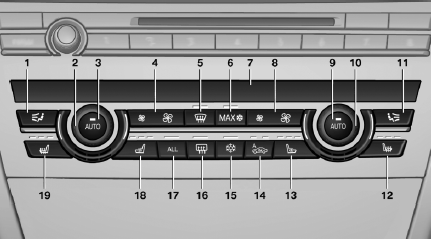
1. Air distribution, left
2. Temperature, left
3. AUTO program, left
4. Air volume, AUTO intensity, residual heat,
left
5. Remove ice and condensation
6. Maximum cooling
7. Display
8. Air volume, AUTO intensity, right
9. AUTO program, right
10. Temperature, right
11. Air distribution, right
12. Seat heating, right
13. Active seat ventilation, right
14. Automatic recirculated-air control/recirculated-
air mode
15. Cooling function
16. Rear window defroster
17. ALL program
18. Active seat ventilation, left
19. Seat heating, left
See also:
Gas station recommendation
The remaining range is calculated, and if necessary
gas stations along the route are displayed.
Even with the most current navigation data, information
regarding individual gas stations may
hav ...
Head-Up Display with full-colour capability
The new-generation Head-Up Display delivers even greater display quality,
functionality and flexibility. The symbols projected onto the windscreen are
displayed in sharp resolution in the driver's ...
Starting navigation system
1. Press the button on the
controller.
2. "Navigation"
The navigation system can also
be accessed
directly with the button on the controller. ...