
Warning of people in danger
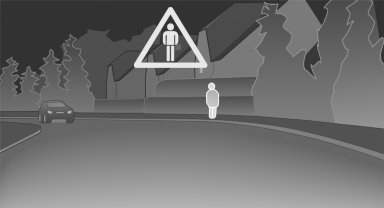
If the system detects a person in the defined area in front of the vehicle and if there is the danger of a collision with this person, a warning symbol appears in the Control Display and Head-up Display.
Although both the shape and the heat radiation are analyzed, false warnings cannot be ruled out.
Warning area in front of the vehicle
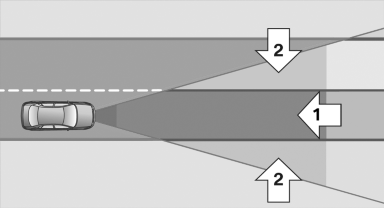
Warning area in front of the vehicle
The warning area in front of the vehicle is divided into two areas.
▷ Central area 1 directly in front of the vehicle.
▷ Expanded area 2 to the right and left.
The entire area moves along with the vehicle in the direction of the steering angle and changes with the vehicle speed. As the vehicle speed increases, the area becomes longer and wider, for example.
Prewarning
 The yellow symbol is displayed
when a
person is detected in the central area,
arrow 1, immediately in front of the vehicle.
The yellow symbol is displayed
when a
person is detected in the central area,
arrow 1, immediately in front of the vehicle.
 The yellow symbol is displayed
when a
person detected in the extended area,
arrow 2, is moving from the right or left
to the central area.
The yellow symbol is displayed
when a
person detected in the extended area,
arrow 2, is moving from the right or left
to the central area.
Acute warning
 The red symbol is displayed and
a signal
sounds. You are requested to intervene
immediately by braking or making an
evasive maneuver.
The red symbol is displayed and
a signal
sounds. You are requested to intervene
immediately by braking or making an
evasive maneuver.
Display in the Head-up Display
 The warning is simultaneously
displayed
in the Head-up Display and in the
Control Display. The displayed symbol
can vary with the people detected. For people
located in the central area, the distance to the
person is indicated by the size of the symbol
The warning is simultaneously
displayed
in the Head-up Display and in the
Control Display. The displayed symbol
can vary with the people detected. For people
located in the central area, the distance to the
person is indicated by the size of the symbol
See also:
The concept
This system can be used to select a desired
speed that the vehicle will maintain automatically
on clear roads.
To the extent possible, the system automatically
adjusts the speed to a slower veh ...
Pressure specifications
The tire inflation pressure table, refer to
page 238, contains all pressure specifications
for the specified tire sizes at the ambient temperature.
Pressure specifications apply to approved
tire ...
In cargo area
Open the right-hand side panel in the cargo
area. ...