
Display
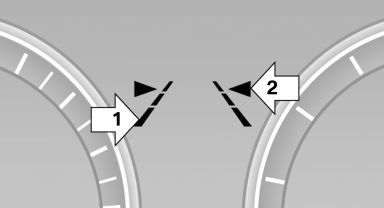
▷ Lines, arrow 1: the system is activated.
▷ Arrows, arrow 2: at least one lane marking
was detected and warnings can be issued.
See also:
Vehicle Overview
Redesigned for 2011, the sixth-generation 5 Series offers a longer wheelbase,
better fuel efficiency and more conventional styling than its predecessor.
Available in 528i, 535i and 550i trims, the ...
Massage function in rear seats
Wavelike motions from the top to the bottom in
the backrest relax back muscles.
Button in rear
Switching on
To switch on, press the button
once for
each massage level.
The highest level i ...
Defrosting and defogging windows
Press the button.
Ice and condensation are quickly removed
from the windshield and the front side
windows.
For this purpose, also switch on the cooling
function. ...