
Activating
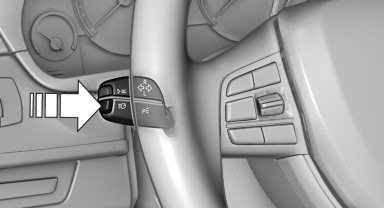
1. Turn the light switch to  or
or
 .
.
2. Press the button on the turn signal lever, arrow.
 The indicator lamp in the
instrument
cluster lights up.
The indicator lamp in the
instrument
cluster lights up.
When the lights are switched on, the high beams are switched on and off automatically.
The system responds to light from oncoming traffic and traffic driving ahead of you, and to adequate illumination, e.g., in towns and cities.
See also:
Resuming the original route
If the route section should no longer be bypassed:
1. "Navigation"
2. "Route information"
3. "New route for:"
4. "Remove blocking" ...
Opening/closing the sliding visor
Press the switch in the desired
direction to the resistance
point and hold it there.
The sliding visor moves while
the switch is being held.
Press the switch in the desired directio ...
Image on the Control Display
Switching on the rear view camera
using iDrive
With Top View activated:
"Rear
view camera"
The image of the rear view camera is displayed.
The setting is stored for the ...