
Folding forward
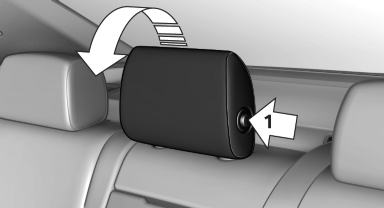
Press the button, arrow 1, and fold the head restraint forward.
See also:
Checking the oil level
The concept
The oil level is monitored electronically and displayed
on the Control Display.
Requirements
The engine must be running and warm after
the vehicle has been driven for at least
...
General driving notes
Close the trunk lid Only drive with the trunk closed. Failure to
do so may endanger passengers or other road users or may damage the vehicle in the
event of an accident or a braking and evasive ma ...
TeleService
General information
TeleService supports communication with your
service center.
▷ Data on the vehicle's service requirements
can be sent directly to the service center. In
this way, the ...