
Navigation
General information
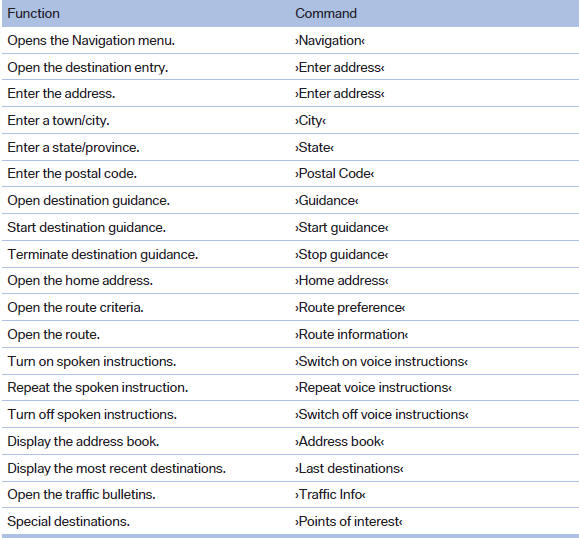
Map

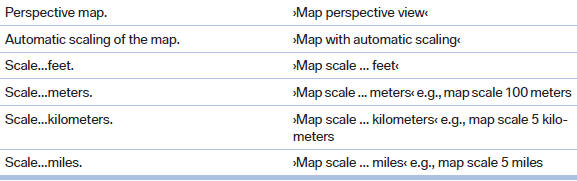
Split screen settings
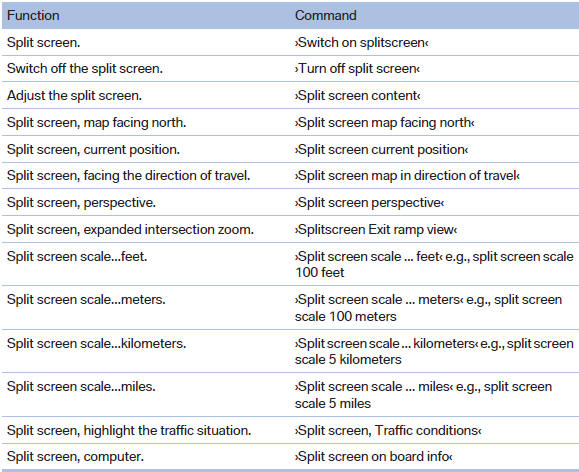

Destination guidance with intermediate destinations

See also:
Resuming the original route
If the route section should no longer be bypassed:
1. "Navigation"
2. "Route information"
3. "New route for:"
4. "Remove blocking" ...
Incoming call
Receiving calls
If the number of the caller is stored in the phone
book and is transmitted by the network, the
name of the contact is displayed. Otherwise,
only the phone number is displayed.
I ...
The concept
The system does not measure the actual inflation
pressure in the tires.
It detects a pressure loss in a tire by comparing
the rotational speeds of the individual wheels
while moving.
In the ev ...