
Adjusting
Vehicle
Equipment

See also:
Switching on/off manually
Switching on/off manually
Press the button.
▷ On: the LED lights up.
▷ Off: the LED goes out. ...
Built for Curves
Like BMW's cars, the X3 offers top-notch road manners. Some may find the
steering wheel too difficult to turn, but its heavy rotations render spot-on
directional control. The meaty steering wheel ...
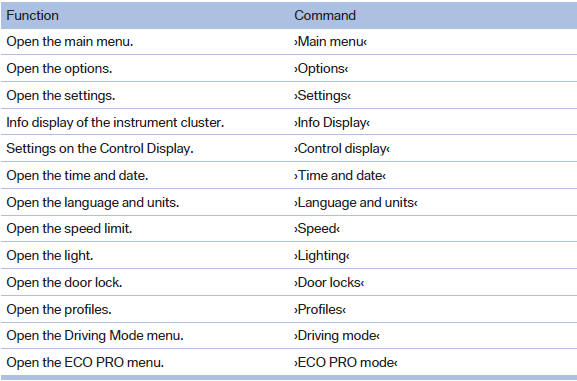
Possible commands
Most menu items on the Control Display can be
voiced as commands.
The available commands depend on the menu
that is currently displayed on the Control Display.
The functions of the main menu hav ...